
Seating a 40-table gala dinner without a spreadsheet
The hard part of seating a gala dinner is that the guest list never stops changing. The room has a fixed number of tables. Sponsors expect to sit near the stage, and a company that bought ten seats wants them together. Or spread out, if the evening is meant for networking.
The usual tool is a spreadsheet, and it works for the first draft. Then a booking is cancelled, someone corrects their email, a company sends a substitute, and the spreadsheet and the booking system start to disagree. On the night, the door team is left checking names against whichever copy they printed.
I built MEFMA’s event operations app for their gala dinners and awards nights. MEFMA is the Middle East Facility Management Association. This is how the seating side works, and what it took.
Where the guest list comes from
MEFMA sells gala tickets on its WordPress site, through a booking plugin with WooCommerce handling the orders. So the first rule was simple: the booking system stays the source of truth, and nobody retypes a guest.
The seating app has one button for this, Sync confirmed bookings. It imports paid and confirmed bookings only, and it checks payment against the linked WooCommerce order, because the booking plugin’s own paid amount turned out to be misleading. Completed complimentary orders count. Pending, failed, cancelled and refunded orders don’t.
Running the sync again updates names, emails and companies that changed in the bookings. Deleted bookings drop out. Guests the team added by hand stay. The part organisers care about most: a guest who is already seated keeps their table when their registration refreshes. The buyer’s membership level (Strategic Corporate, Corporate or Associate) comes across too, from the membership plugin on the same site.
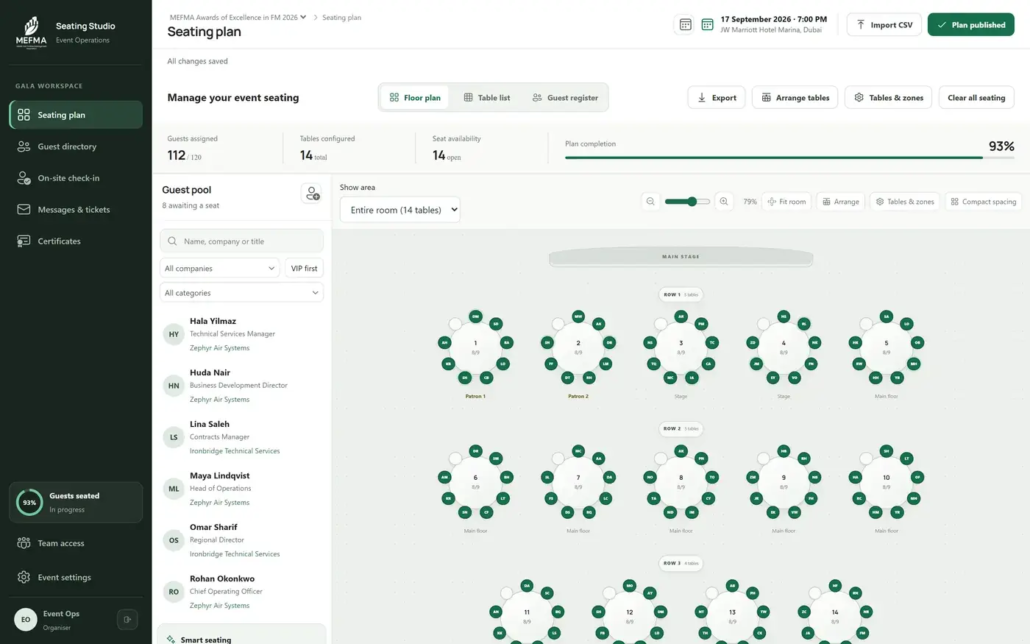
Laying out the room
The room is built row by row, from the stage to the back. A row holds anywhere from 1 to 20 tables, and a table seats between 4 and 20 people. For one awards gala the layout was 40 tables in four rows of 10, 11, 12 and 7. The app refuses a layout whose rows don’t add up to the room’s table count, and it won’t let anyone shrink a table below the number of guests already sitting at it.
Each table can belong to a zone (Stage, Main, a VIP area) and can carry an optional name such as “Sponsors”. Guests only ever see the number. The name is for the organisers.
There are three views of the same plan: a floor plan you can zoom, a table-by-table list and a searchable guest register. Edit one and the other two follow, since they all read the same data.
Auto-seating you can check before you accept it
The first version of auto-seating was a single button running one formula. I replaced it, because an organiser needs to see what the machine is about to do before it does it.
Now you pick a strategy: balanced networking, keep companies together, or maximum company mix. You decide whether to fill tables tightly or spread guests across every table, and which membership levels get priority near the stage. VIPs always do. The algorithm also balances senior titles (chairs, C-suite, VPs, directors, heads) across tables, so one table doesn’t collect every decision-maker in the room.
It shows a preview first: guests it would seat, tables it would use, how many people sit with a colleague, how mixed each table is. Nothing changes until someone clicks Apply. Manual seats are kept. Capacities are never exceeded. If the room is too small, the preview lists who would be left unseated instead of squeezing them in somewhere.
The email and the door
When the plan is ready, each guest gets an email with their first name, table number, the evening’s schedule and a personal QR code. The team edits the subject and body with a live preview, and test sends go out through MEFMA’s own Microsoft 365 mailbox via their WordPress site.
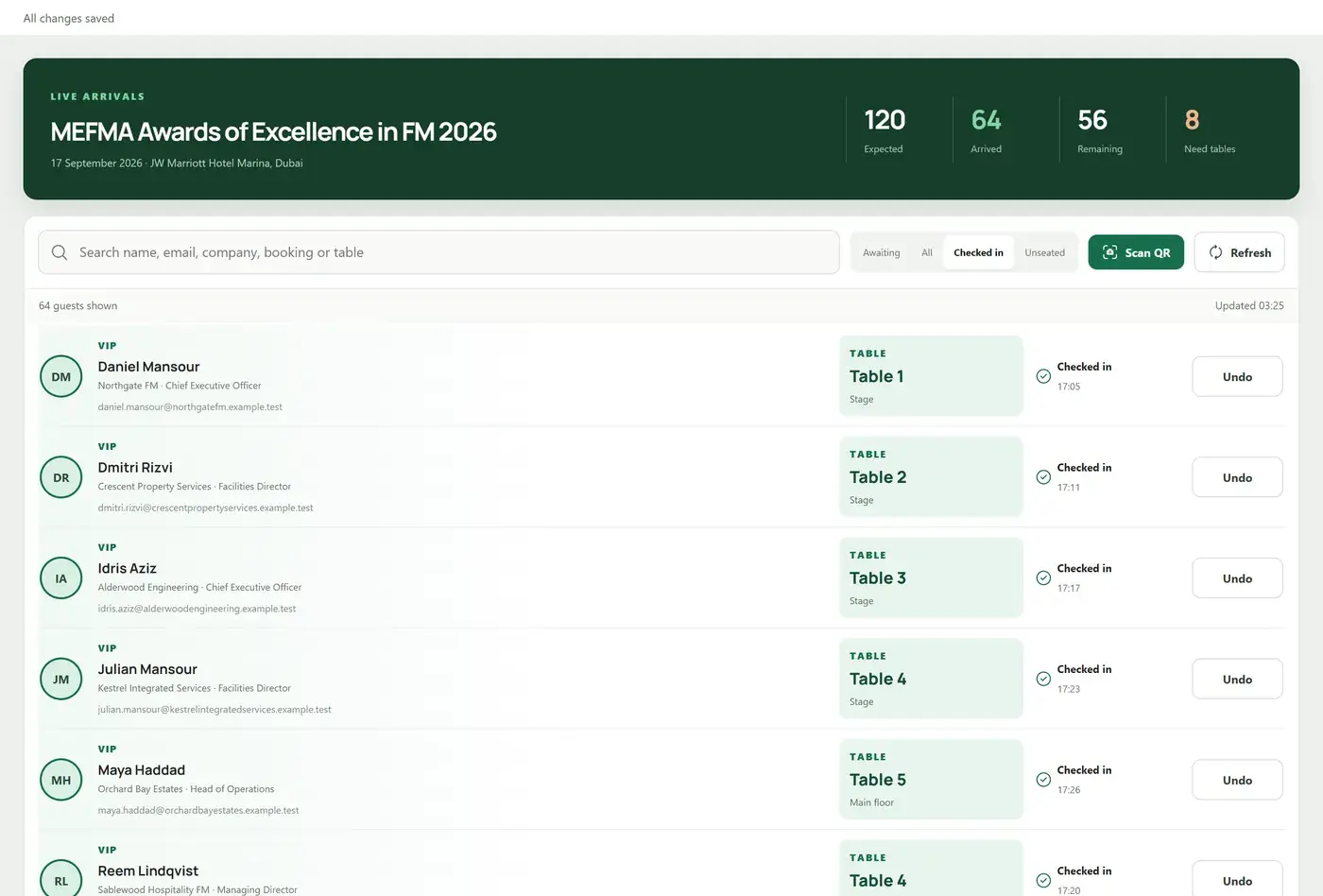
At the door, staff scan that QR with a phone camera. The video is processed in the browser and never uploaded. A scan resolves to exactly one guest, shows their table and zone before confirming, and records the time and the staff member, with an undo. If a code won’t scan, there’s a search by name, email, company or booking reference. Several desks can work at once: arrival counts sync every 15 seconds, and the server stops two desks from checking in the same person. Door staff can have check-in-only accounts.
Guests can also check themselves in on a public page with their registration email, and land on a welcome screen with a large table number.
The QR codes that didn’t match
One part was harder than it looked. MEFMA’s booking invoices already carried QR codes, so the door should accept those too. The first version matched each scan against a code stored with the booking. A test scan missed, because the invoice QR held a different, shorter key. Matching on that key failed as well: the booking system never returned it in its data. Only the website knew which invoice it belonged to.
The fix was a staff-only lookup that asks mefma.org which invoice a key belongs to, remembers the answer and limits how often it asks. On top of that, the sync now reads each guest’s own ticket QR from their invoice page. For one event that linked 235 of 256 guests to an individual QR. The other 21 were on complimentary bookings where the booking system had issued no ticket QR at all, and they still match at booking level.
I mention it because it’s typical. “Scan a QR at the door” sounds like one feature. Making it match the codes already sitting in guests’ inboxes meant asking why each scan failed, again, until the answer was in the data. Until real codes were verified, the QR option in the email stayed switched off. Showing no QR beats showing a fake one.
What the organisers get at the end
The spreadsheet does come back, as output. Once the plan is final there’s a MEFMA-branded PDF with a floor plan, table-by-table seating and an alphabetical index, plus an Excel workbook, a CSV and an SVG floor plan. The spreadsheet becomes a printout of the plan rather than the place the plan lives.
“Publish plan” marks the current arrangement as approved inside the team. It doesn’t email anyone. Any later edit sends it back to Draft, so the team can see that something changed after sign-off.
The same app also runs a live awards game for the evening, built for about 500 guests on their phones. Load-testing that game is a separate article.
If you run events
You don’t need a gala to have this problem. Any business that sells seats or sessions in one tool and runs the day from another has the same gap: the list changes and the copies drift. Training days, conferences and workshops all work this way.
The first questions I ask are plain ones. Where do bookings really live? Who changes them, and how late? What has to happen at the door? The answers decide whether you need a full app or just a reliable sync and a good check-in page.
If your events work like this and you’d like to compare notes, you can reach me on WhatsApp.
Related work: MEFMA Event Operations
