Notes from building business systems: events, cafés, CRMs and the work behind them.

What custom AI agents do on my projects, and what stays with me

When a new client asks how I work, I tell them early that I use custom AI agents. Some people relax when they hear it. Others get nervous. Both reactions make sense, so here is what it actually means on a project, and where the line sits.

The short version

I’ve built websites since 2016, more than 150 of them. The way the work gets done has changed since then. Now I write the spec, custom agents I’ve set up do much of the building and testing, and I review every change before it ships.

The agents don’t talk to clients, and they have no say in what gets built or when it’s finished.

What the agents do

I run four roles, each set up for my projects, my conventions and my checklists.

The builder agent writes code from the spec. The test agent writes and runs tests. The review agent reads each change and flags problems. The ops agent handles deployments and keeps an eye on things once they’re running.

Where they help most is volume. The MEFMA event app has 63 automated unit tests. Fluffy’s café workspace has 49 test files. My own product, Unmu, has 1,886 automated tests passing. Writing that many tests alone, by hand, used to be the first thing a small project cut. With agents it’s routine. That doesn’t make the tests right by default. I still read what each one checks, because a test that checks the wrong thing is worse than no test: it tells you everything is fine.

Deciding where AI doesn’t belong

Homepage of Dr. Ehab Hamarneh's Arabic coaching academy, the public front of the system behind it
Dr. Ehab Hamarneh’s academy. Behind the site sit lead capture, a help desk and an order portal.

The most useful decisions on a project are often about where not to use AI at all.

Dr. Ehab Hamarneh runs an Arabic coaching academy, Be You Training, and I built the support desk behind it. Tickets get sorted into categories like Payment, Courses and Password. That sorting is deliberately keyword-based: it’s free, instant and predictable, and a support agent can see exactly why a ticket landed where it did. If a person changes a category by hand, the system doesn’t overwrite their choice.

The chat widget on the site works the same way. It searches the academy’s own knowledge base first. If an article matches, it answers from that article, with no AI call at all. Only when nothing matches does it either try an AI answer (if that’s switched on) or hand the customer to a person, which opens a real ticket. Every AI call it does make is logged with its token usage, so the cost is visible.

A model could have done all of that. It would have been slower, cost money on every message, and been harder to explain to the support team. Choosing the plain option is my job. Agents are good at doing what they’re asked, and they rarely ask whether the task needs AI in the first place.

Deciding what’s safe

The same desk receives newsletters and sales pitches alongside real customer email. Those junk messages are closed and tagged, never deleted. Deleted mail can’t be recovered, and a real customer misjudged as junk would vanish without anyone noticing. Closed and tagged, they stay searchable and one click from being reopened.

Arabic needed its own care. Customers spell the same course name several ways: with or without a shadda, with different forms of alef, with Arabic or Western digits. The tagging normalises all of that before matching, so one rule catches every spelling. It only ever adds tags. An agent’s own tags are never removed.

None of these choices is clever. They come from thinking about what could go wrong for this particular business, and that thinking is the part I don’t hand off.

Refusing to fake it

On the MEFMA event app, guests were meant to get a QR code in their table email. For a while, the real per-guest QR from the booking system wasn’t verified yet. The easy move was a placeholder QR that looked right. The checklist said the opposite, in plain words: do not render a fake QR. The option stayed switched off until real codes were confirmed.

The same goes for test results. When I load-tested MEFMA’s awards game with 1,000 simulated players, the first attempt, run from a desktop, failed: connections timed out after 203 live streams opened. That failed run is kept in the report as evidence, next to the run that passed. The report also says what the passing test doesn’t prove, such as venue Wi-Fi or real phones. An agent can write that report. Deciding that the limits paragraph stays in is mine.

What you deal with

You deal with me. We talk on WhatsApp in plain language. I write a short spec you can read and change before anything is built. You see a demo every week. After launch, I support what I shipped.

If something breaks, you don’t get “the AI did it”. You get me, and I answer for it, because I reviewed it and shipped it.

What this means if you’re hiring someone

Most builders use AI tools now, whether they mention it or not. The useful questions are about the work around the tools. Ask who reads the code before it goes live, and how it’s tested. Then ask who you call when it stops working at 9pm on a Thursday.

For my projects the answers are short: I read it, the tests are in the project, and you call me.

If you have questions about how this works on a real project, you can ask me on WhatsApp.

Related work: See the systems this applies to
WhatsApp-first CRMs for Gulf and Türkiye businesses

Many of my clients are in Türkiye and the Arab world, and in both places customers tend to message a business on WhatsApp first. Email gets read late, if at all. Phone calls happen when something has already gone wrong. Even the main button on my own site opens a WhatsApp chat, for the same reason.

So when a business asks me for a CRM, my first question is how WhatsApp fits into it. The second question matters more: how do we use it without annoying people or getting the number banned?

This article walks through the design I use, with the CRM I built for Fluffy, a café in Istanbul, as the worked example. I’ll also say plainly which parts are live and which are waiting on the owner.

What the customer record holds

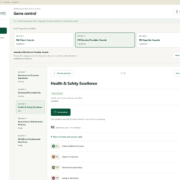
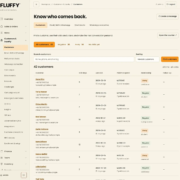
Customer directory in the Fluffy CRM with segments and visit counts, sample customers
Customer profiles are built from visits the café already records. Sample data.

A WhatsApp-first CRM still starts with the customer record. The messages come second. In Fluffy’s case, every loyalty member appears in the directory automatically. A profile holds contact details, notes, follow-up dates, contact permissions, orders, visit patterns and message history.

Visits come from data the café already has: paid loyalty stamps, paid till receipts and menu orders linked to the customer. That gives useful groups without anyone tagging customers by hand. Regulars are people with five or more visit days. Away means they haven’t come in for longer than a threshold the owner sets. No visits yet speaks for itself.

Those groups are what make messaging worth doing. “We miss you” to people who are actually away is a reasonable message. The same text sent to everyone is spam.

Two ways to send on WhatsApp

There are two realistic routes for a small business, and the CRM supports both.

The official route, through Twilio. Messages use templates that WhatsApp has approved in advance. You configure the exact approved text, opt-out wording included, and the only variable is the customer’s name. It’s slower to set up and less flexible. It’s also the route least likely to cause trouble with WhatsApp.

A linked phone, through a private gateway. The CRM can also send through a small gateway (OpenWA) running on the café’s own server, paired with a phone using WhatsApp’s Linked devices feature. That allows ordinary text with the customer’s name filled in. The trade-off is real: it relies on unofficial clients, so I tell owners to use a dedicated number, never their personal one, and that no one can guarantee the number won’t be restricted.

Because of that risk, the gateway route is paced hard. Messages go out at least 60 seconds apart, and the gateway itself is capped at 20 messages a day and 5 to people who haven’t been contacted before. That’s slow on purpose.

Consent before anything else

This is the part I won’t compromise on.

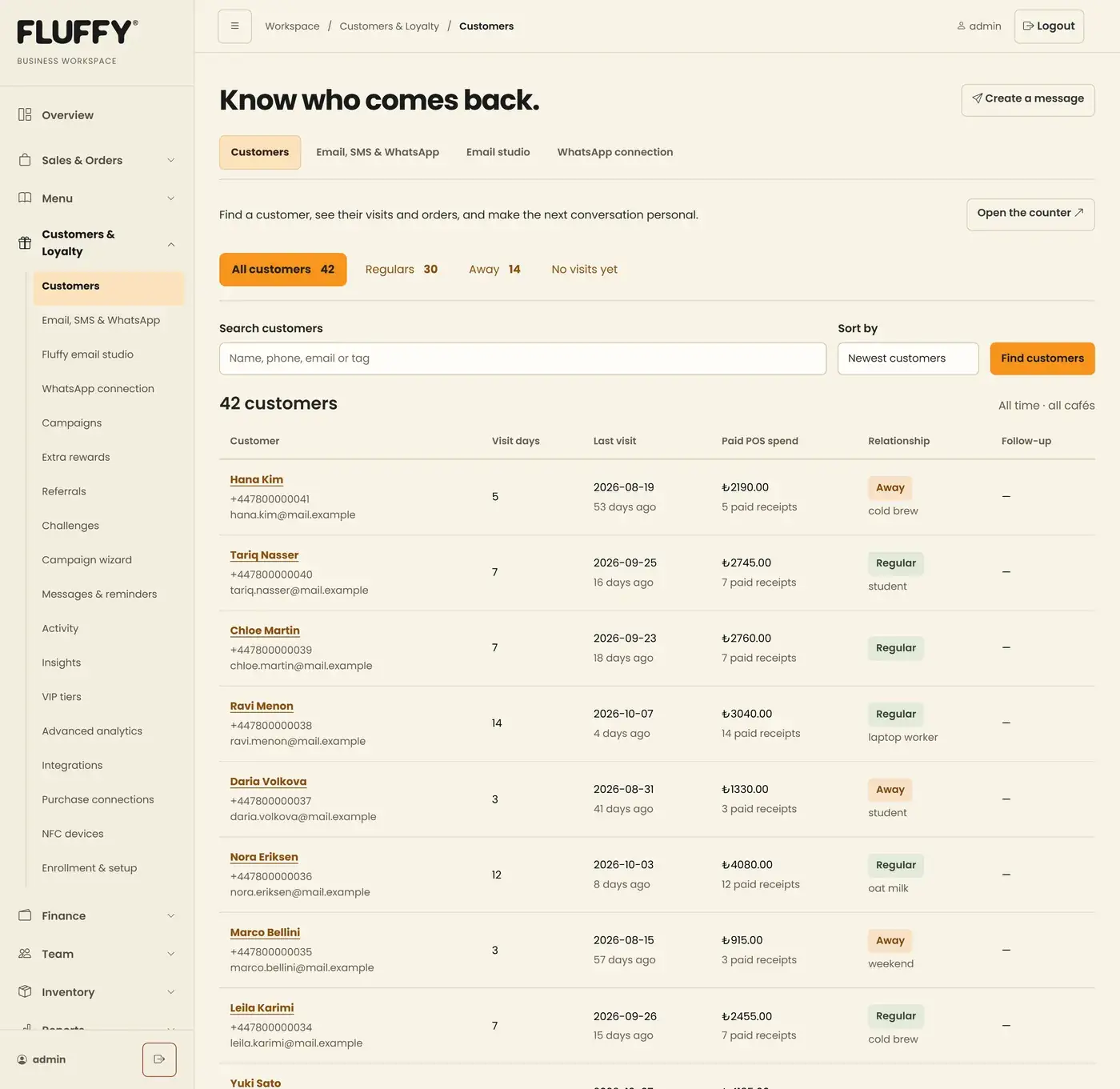
Existing customers start with WhatsApp and email permission switched off. Staff can record that a customer agreed, but they have to confirm it, and the change is logged. Every message carries a signed link where the customer can change or withdraw permission. On the gateway route, a reply of STOP, UNSUBSCRIBE or İPTAL removes WhatsApp permission automatically, and that is logged too.

Sending respects quiet hours in Istanbul time and a daily cap per customer and per channel. Right before each message goes out, the system checks again: is permission still there, is the number unchanged, is the campaign still active? If any answer is no, that message is cancelled.

Review, then send

Messages never go out from the compose box. You write a draft, save it, and preview it next to the list of who will receive it and who is excluded and why. Only then do you queue it. A separate worker does the sending, a few messages per run.

The status words are honest. “Submitted” means the provider accepted the message, nothing more. If a send times out, the system marks it uncertain and does not retry it on its own, because a customer receiving the same promotion twice is worse than one message going missing.

When the gateway is connected, incoming replies show on the customer’s profile with the date and direction, and a reply link opens the composer with that customer selected. Only known customers are matched. Group chats are ignored, and photos or files appear as a label without being downloaded.

Where it stands today

The CRM, the consent rules and the review flow are built. The private gateway is deployed on the server. What hasn’t happened yet is the last step that belongs to the café: linking a dedicated phone. Until that’s done, no customer messages have been sent through it, so I can’t show you delivery numbers. I’d rather say that than imply otherwise.

The Arabic side

For Arabic-speaking businesses, language handling matters as much as the channel. On the help desk I built for Dr. Ehab Hamarneh’s coaching academy, customers write the same course name several ways, with different letter forms and with Arabic or Western digits. The system normalises those spellings before matching so tickets are tagged correctly. The chat widget answers in Arabic by default. Tickets that arrive on Friday, Saturday or a public holiday get an automatic reply saying when the team will be back.

In Türkiye the default is Turkish, with English and Arabic available. Fluffy’s loyalty pages work that way, and Arabic switches to right-to-left.

What this means for your business

If your customers already write to you on WhatsApp, the channel is settled. The decisions that matter are smaller and more specific. Which number will you use, and is it one you can afford to lose? Official templates or a linked phone? Who on your team can send, and to whom? What happens when a customer says stop?

Answer those first and the software is the easy part.

If you’re working through these questions for your own business, I’m happy to talk them over on WhatsApp.

Related work: Fluffy Operations workspace

Load-testing a live awards game with 1,000 simulated players

A live game at a gala has one awkward property: everyone acts at the same moment. The screen says “Category starts now”, and a few hundred phones send a request within the same second. If the server stumbles there, it stumbles in front of the whole room.

For MEFMA’s awards night I built Guess the Winner, a prediction game guests play on their phones during the ceremony. It was built for about 500 guests. Before trusting it with a ballroom, I wanted to know what would happen with twice that number. This is how the test went, including the part that failed.

How the game works

Guests open a link, enter their table representative’s name and table number, and they’re in. There are three rounds: FM Client Awards with four questions, FM Service Provider Awards with five, and FM Supplier Awards with three. Twelve questions in total.

The host controls everything from a separate, password-protected screen. Starting a question puts it on every guest’s phone. Guests pick one of the four or five nominees, and their pick is saved as a draft until the host ends the question. Then the picks are submitted together.

Guests never see a leaderboard or the correct answers. The answer key is never sent to the browser at all, so nobody can find it by poking at the page. Scores are private to the host, with round totals, overall totals and CSV exports. The guest with the most correct predictions wins.

What could go wrong

Three moments carry most of the risk. The first is joining, when hundreds of people arrive at once. The second is the switch to a new question, when every phone has to update. The third is a round boundary, where phones may lose and regain connection.

So the test had to cover all three, through the same public HTTPS address guests would use, against the same server code. It also had to leave the real event data alone.

The first attempt failed

My first run used a load generator on a desktop machine, sending traffic over the internet to the live server. It joined all 1,000 simulated participants. Then it started opening the live connections that keep each phone in sync, and those started timing out on the way through Cloudflare, the service that sits in front of the website. It stopped after 203 of those connections opened. The slowest join took 7.7 seconds.

The public site kept answering its health checks the whole time. That suggested the bottleneck was the test machine and its route rather than the server. But a suggestion isn’t a pass. The run didn’t prove synchronisation, so it’s recorded as a failure and kept in the evidence alongside the run that passed.

The test that passed

The second run, on 10 September 2026, generated the load on the server itself, and still sent it through Cloudflare and the public web address. It used an isolated game on the same server with the same deployed backend code. Live participants and answers were not touched.

The simulated players behaved like the real guest app, including the small random delays real phones add and the backup checks the app makes when a live connection drops. They saved answers in bursts and played all three rounds.

Here is what it measured:

  • 1,000 players joined at once. The slowest join took 761 milliseconds, under a second.
  • All 1,000 stayed connected for live updates, and 50 were deliberately dropped and reconnected.
  • On every one of the 12 question switches, all 1,000 phones caught up, the slowest in 572 milliseconds.
  • At round boundaries, everyone was back in sync within about two seconds, including 50 players cut off on purpose for one and a half seconds.
  • The test also ran the game’s optional 60-second timer: when a question expired, all 1,000 phones showed it closed within about half a second.
  • 12,000 answers were stored, exactly 1,000 per question, with nothing left unsaved. The database check came back clean.
  • A separate monitor checked the public site 92 times during the run. None failed.
  • There were no unexpected disconnects and no restarts, and the whole run took 89.3 seconds.

Afterwards, the temporary test entry point was removed from the server.

A second test, for the voting rules

Speed isn’t the only risk. A game can be fast and still count votes wrongly. A separate test, with 500 simulated players on an isolated local setup, went after correctness.

It sent identical vote retries and checked they weren’t counted twice. It sent stale changes and checked they were rejected. It raced 500 votes against the host closing a question: 250 got in, 250 were refused, and the totals reconciled exactly. It restarted the server mid-game and checked that sessions, votes and scores survived. All 6,000 answers were stored and every score matched, including the rule that either of two joint winners earns a point.

What these tests don’t prove

The 1,000-player report says this plainly, and I think every load test report should. The load ran on the server. It does not reproduce 1,000 physical phones, venue Wi-Fi, how each device renders the page, every internet route, or hours of operation. Zero issues on the night can’t be guaranteed from a test like this.

The 500-player test has its own limits: it ran on a single local machine, with simulated players, and it didn’t cover the live hosting setup or venue Wi-Fi.

Writing those limits down can feel like weakening the result. In practice it tells the organiser what’s left to manage on the day, like the Wi-Fi in the ballroom, so a big number doesn’t stand in for certainty.

If your business has a rush moment

Plenty of businesses have a moment where everyone arrives at once: a ticket release, a product drop, the start of a live session, a sale that opens at 10am. If yours does, that’s the moment to test, on the real route, with honest limits written next to the result.

The questions I’d ask are simple. How many people at once, realistically and at worst? What do they all do in the first ten seconds? What happens if some of them lose signal?

If you have a moment like that coming up and want a second opinion on testing it, you can reach me on WhatsApp.

Related work: MEFMA Event Operations

When a business needs a system, not just a website

I’ve built more than 150 websites since 2016, and most businesses that ask me for help need exactly that: a clear, fast site that makes it easy to get in touch. I say so on the first call, because it’s cheaper for them and it’s the truth.

Some businesses need something else. A website tells people about the business. A system runs part of it. It holds information that changes every day, and people on the team act on that information. Size and budget don’t decide which one you need. What decides it is what the software has to do on an ordinary Tuesday.

Here are the signs I look for, each taken from a system I’ve built.

1. You copy the same information between two tools

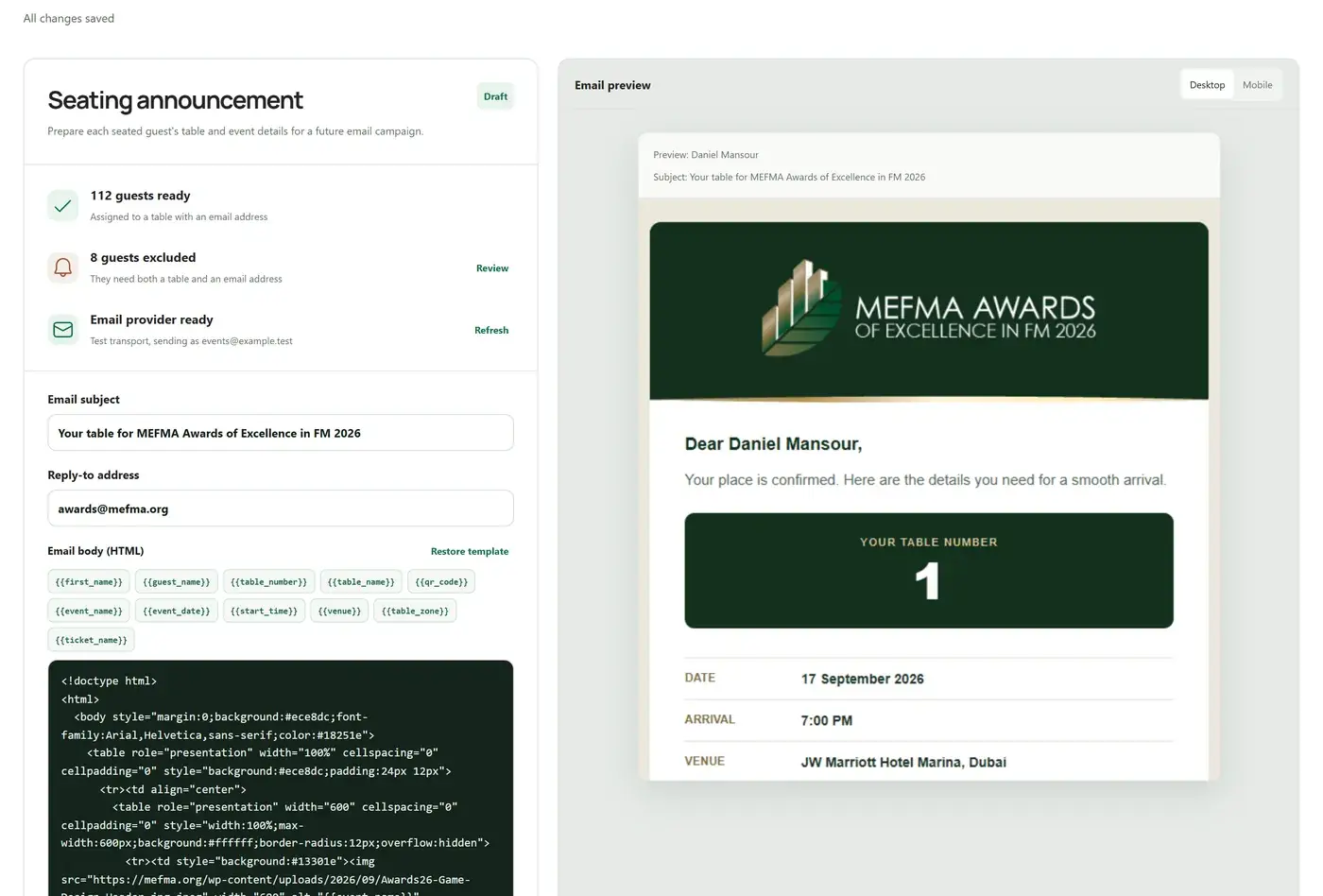
Guest email preview in the MEFMA event app, with the table number and a personal QR code, sample guest
Once bookings sync in, the table email is built from the same data. Sample guest.

MEFMA, the Middle East Facility Management Association, sells gala tickets through its WordPress site. Seating those guests is a separate job. Without a link between the two, every change to a booking has to be carried across by hand, and two copies of a guest list will always drift apart.

The seating app I built for them pulls paid, confirmed bookings straight from the booking system with one sync button. Names and emails that change in a booking update in the seating plan. A guest who’s already seated keeps their table. The table email, the QR code and the door check-in all read from that one list.

If someone on your team spends part of each week retyping or reconciling, that’s the first sign.

2. Different people need different views of the same thing

Fluffy is a cheesecake café in Istanbul with two branches. The owner needs to see the whole business: sales, costs, staff and customers, by branch or combined. A barista needs to scan a loyalty card and add a stamp, and nothing else. In the workspace I built for them, staff get a simpler home with only the actions they’re allowed, and branch permissions are enforced on the server as well as in the menus.

A website shows everyone the same page. When you need roles, permissions and a history of who did what, you’re past a website.

3. Money or points move, and mistakes must be reversible

Dr. Ehab Hamarneh’s coaching academy sells through sales agents in several countries. I built them an Arabic order portal where each agent records orders on top of WooCommerce, which stays the only order database. Agent commission is calculated on the cash actually received, after refunds. If the cash recorded is more than 2% away from the invoice, the agent has to write a reason, and that reason goes into the export. Agents can correct a receipt for 7 days after payment, and every correction is logged with the old and new amount.

Fluffy’s loyalty stamps work on the same principle. A stamp can be reversed, but only with a reason, and both entries stay in the history.

When money, commissions or reward points change hands, you need records that can be corrected without being erased. A form that sends an email can’t do that.

4. Your inbox has become a workflow

The same academy handles customer support by email, so I built them a help desk with routing, categories and a knowledge base. Some of the most useful fixes were small. The website contact form was sending messages from the academy’s own address with the customer’s email buried in the body, so a support agent who clicked Reply was writing back to the academy itself. The desk now reads the customer’s real address from the message. Tickets that arrive on a weekend or public holiday get an automatic reply saying when the team is back. Newsletters that land in the support inbox are closed and tagged instead of piling up as open tickets.

If your team says “check the inbox” when they mean “find out what’s going on”, that’s a sign.

5. Many people show up at the same moment

A website can usually cope with a busy day. A live game where hundreds of guests press a button in the same second is different. For MEFMA’s awards night I built a prediction game for about 500 guests and load-tested it with 1,000 simulated players before trusting it with the room.

If your business has a rush moment (a ticket release, a live session, a sale at a fixed time) and something has to be counted correctly during it, you need more than a page.

When a website is the right answer

Falcon Syria needed a catalogue: 36 flavours in English and Arabic, 80 pages generated by a custom static build, with an age gate. That’s a website, and a fast one. The only system-like part was a protected form for wholesale enquiries and a small CRM for reseller applications. Everything else is pages people read.

If the job is to be found, explain what you do and get a message, a website is the right tool. A system you don’t need still has to be maintained.

How systems usually start

Often the website comes first and the system grows next to it. For Fluffy, I started with the website, a QR menu and a staff attendance system, and the workspace came later. For Dr. Ehab, the public site sits in front of a live-session portal, a help desk and an agent order portal, each added for a specific job. In both cases the new parts were built around what was already working, like WordPress and WooCommerce, instead of replacing it.

A system also needs looking after. It has tests, it gets updates, and someone has to answer when it misbehaves. When I build one, I write a short spec first that you can read and change, you see a demo every week, and I support it after launch.

Where to start

Pick the one task that eats the most time or causes the most mistakes in your week. Describe it the way you’d describe it to a new employee. That description is usually the first page of a spec.

If you’re not sure whether you need a system or a better website, send me a WhatsApp message and describe how a normal day works. I’ll tell you which one I think you need, even if it’s the smaller one.

Related work: Selected work

Seating a 40-table gala dinner without a spreadsheet

The hard part of seating a gala dinner is that the guest list never stops changing. The room has a fixed number of tables. Sponsors expect to sit near the stage, and a company that bought ten seats wants them together. Or spread out, if the evening is meant for networking.

The usual tool is a spreadsheet, and it works for the first draft. Then a booking is cancelled, someone corrects their email, a company sends a substitute, and the spreadsheet and the booking system start to disagree. On the night, the door team is left checking names against whichever copy they printed.

I built MEFMA’s event operations app for their gala dinners and awards nights. MEFMA is the Middle East Facility Management Association. This is how the seating side works, and what it took.

Where the guest list comes from

MEFMA sells gala tickets on its WordPress site, through a booking plugin with WooCommerce handling the orders. So the first rule was simple: the booking system stays the source of truth, and nobody retypes a guest.

The seating app has one button for this, Sync confirmed bookings. It imports paid and confirmed bookings only, and it checks payment against the linked WooCommerce order, because the booking plugin’s own paid amount turned out to be misleading. Completed complimentary orders count. Pending, failed, cancelled and refunded orders don’t.

Running the sync again updates names, emails and companies that changed in the bookings. Deleted bookings drop out. Guests the team added by hand stay. The part organisers care about most: a guest who is already seated keeps their table when their registration refreshes. The buyer’s membership level (Strategic Corporate, Corporate or Associate) comes across too, from the membership plugin on the same site.

Laying out the room

The room is built row by row, from the stage to the back. A row holds anywhere from 1 to 20 tables, and a table seats between 4 and 20 people. For one awards gala the layout was 40 tables in four rows of 10, 11, 12 and 7. The app refuses a layout whose rows don’t add up to the room’s table count, and it won’t let anyone shrink a table below the number of guests already sitting at it.

Each table can belong to a zone (Stage, Main, a VIP area) and can carry an optional name such as “Sponsors”. Guests only ever see the number. The name is for the organisers.

There are three views of the same plan: a floor plan you can zoom, a table-by-table list and a searchable guest register. Edit one and the other two follow, since they all read the same data.

Auto-seating you can check before you accept it

The first version of auto-seating was a single button running one formula. I replaced it, because an organiser needs to see what the machine is about to do before it does it.

Now you pick a strategy: balanced networking, keep companies together, or maximum company mix. You decide whether to fill tables tightly or spread guests across every table, and which membership levels get priority near the stage. VIPs always do. The algorithm also balances senior titles (chairs, C-suite, VPs, directors, heads) across tables, so one table doesn’t collect every decision-maker in the room.

It shows a preview first: guests it would seat, tables it would use, how many people sit with a colleague, how mixed each table is. Nothing changes until someone clicks Apply. Manual seats are kept. Capacities are never exceeded. If the room is too small, the preview lists who would be left unseated instead of squeezing them in somewhere.

The email and the door

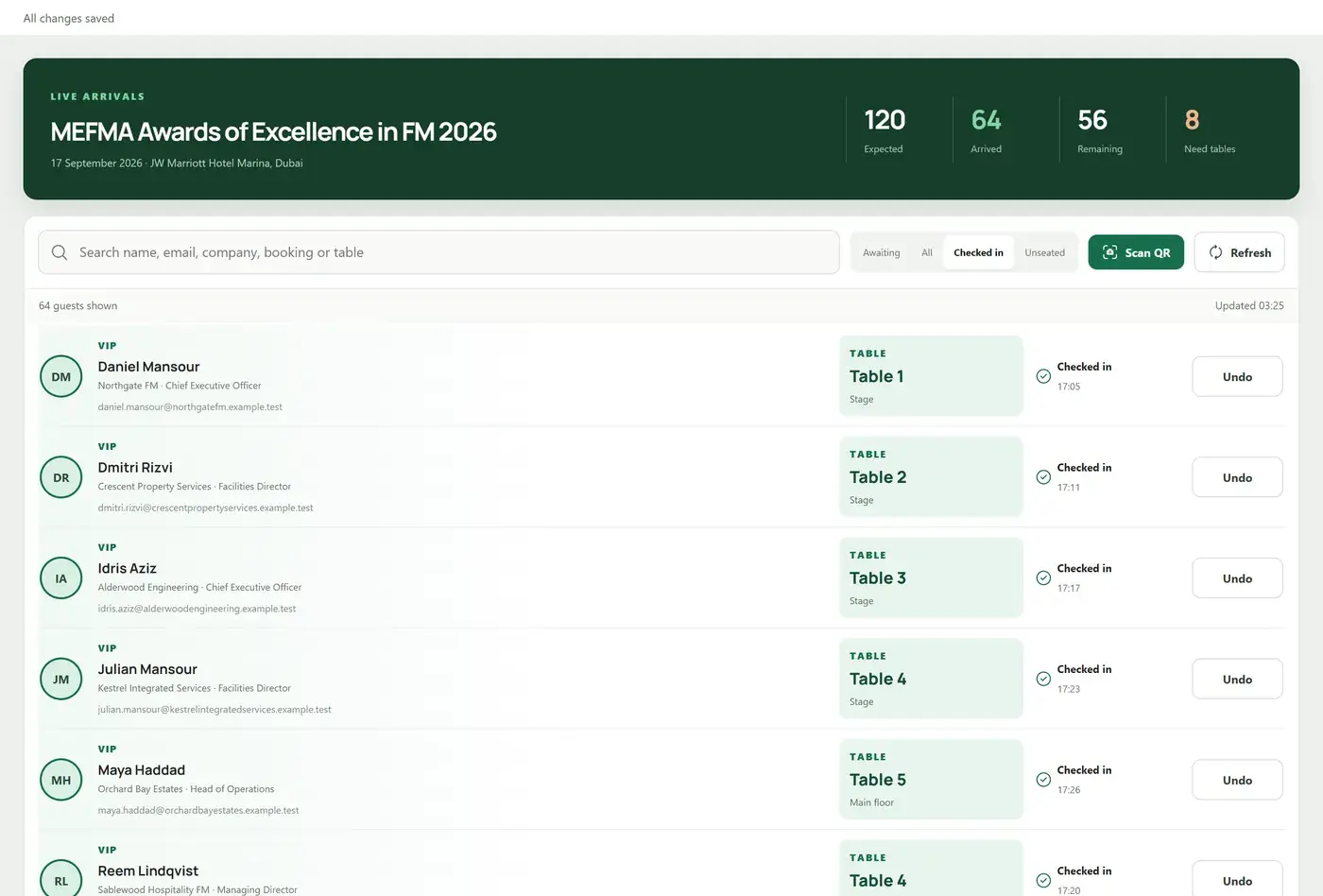
On-site check-in screen showing arrival counts and a searchable guest list, with sample guests
The door view: live arrival counts, search and an undo for every check-in. Sample data.

When the plan is ready, each guest gets an email with their first name, table number, the evening’s schedule and a personal QR code. The team edits the subject and body with a live preview, and test sends go out through MEFMA’s own Microsoft 365 mailbox via their WordPress site.

At the door, staff scan that QR with a phone camera. The video is processed in the browser and never uploaded. A scan resolves to exactly one guest, shows their table and zone before confirming, and records the time and the staff member, with an undo. If a code won’t scan, there’s a search by name, email, company or booking reference. Several desks can work at once: arrival counts sync every 15 seconds, and the server stops two desks from checking in the same person. Door staff can have check-in-only accounts.

Guests can also check themselves in on a public page with their registration email, and land on a welcome screen with a large table number.

The QR codes that didn’t match

One part was harder than it looked. MEFMA’s booking invoices already carried QR codes, so the door should accept those too. The first version matched each scan against a code stored with the booking. A test scan missed, because the invoice QR held a different, shorter key. Matching on that key failed as well: the booking system never returned it in its data. Only the website knew which invoice it belonged to.

The fix was a staff-only lookup that asks mefma.org which invoice a key belongs to, remembers the answer and limits how often it asks. On top of that, the sync now reads each guest’s own ticket QR from their invoice page. For one event that linked 235 of 256 guests to an individual QR. The other 21 were on complimentary bookings where the booking system had issued no ticket QR at all, and they still match at booking level.

I mention it because it’s typical. “Scan a QR at the door” sounds like one feature. Making it match the codes already sitting in guests’ inboxes meant asking why each scan failed, again, until the answer was in the data. Until real codes were verified, the QR option in the email stayed switched off. Showing no QR beats showing a fake one.

What the organisers get at the end

The spreadsheet does come back, as output. Once the plan is final there’s a MEFMA-branded PDF with a floor plan, table-by-table seating and an alphabetical index, plus an Excel workbook, a CSV and an SVG floor plan. The spreadsheet becomes a printout of the plan rather than the place the plan lives.

“Publish plan” marks the current arrangement as approved inside the team. It doesn’t email anyone. Any later edit sends it back to Draft, so the team can see that something changed after sign-off.

The same app also runs a live awards game for the evening, built for about 500 guests on their phones. Load-testing that game is a separate article.

If you run events

You don’t need a gala to have this problem. Any business that sells seats or sessions in one tool and runs the day from another has the same gap: the list changes and the copies drift. Training days, conferences and workshops all work this way.

The first questions I ask are plain ones. Where do bookings really live? Who changes them, and how late? What has to happen at the door? The answers decide whether you need a full app or just a reliable sync and a good check-in page.

If your events work like this and you’d like to compare notes, you can reach me on WhatsApp.

Related work: MEFMA Event Operations

A café’s loyalty, payroll and stock in one workspace

Fluffy is a Japanese soufflé cheesecake café in Istanbul, with branches in Taksim and Fatih. My first work for them was the website, a multilingual QR menu and a staff attendance system. Over time, most of the rest of the business moved into one workspace that I built and still look after.

This article is about why that happened, what’s inside it, and the trade-offs a café owner should know about before asking for something similar.

The problem with many small tools

A café produces numbers all day. The till exports sales. The bank sends statements. Suppliers send e-invoices. Staff check in and out. Loyalty lives on a paper card or a separate app. Each of these is fine on its own. The trouble starts when the owner asks a question that crosses two of them: what did this cake really cost us last month, or which staff hours produced which sales, or are our regulars coming back.

The brief we worked to was short. The owner needs an overview of the whole business. Staff need a simpler home with quick access to the work they’re allowed to do. And every figure on screen has to say which period it covers, which branch, and where it came from.

What’s inside

Today the workspace covers the menu, loyalty, till sales, stock and recipes, the ledger, payroll and attendance, and a customer CRM. Behind it are 126 database tables and 49 test files. That size is the honest cost of one place for everything, and it’s why the tests matter.

A few of the parts, in plain terms.

Till sales. The workspace imports the POS files from each branch. It also reads bank files, which use the Turkish number format (a dot for thousands, a comma for decimals) while the POS files don’t. It’s a small detail. Get it wrong and the totals look plausible while being wrong, which is worse than having no total.

Menu orders kept apart. Orders placed through the QR menu are a separate source from the till. They are never counted as booked POS revenue. If they were, the same coffee could be counted twice.

Stock. Purchases come in from mapped e-invoice lines, and transfers between branches are recorded. Usage is calculated from POS sales multiplied by recipes, so the system knows how much milk and cream a day of cheesecake sales should have used. Expected stock is the last count, plus purchases, plus or minus transfers, minus usage and waste. When the shelf disagrees with that number, someone has a reason to look.

Payroll. Monthly pay is worked out from check-in logs. Base pay follows the hours actually worked, and overtime only counts once it’s approved. On top of that sits a sales bonus, weighted by how many of an employee’s hours were at each branch, and a manual adjustment that has to carry a note.

Loyalty without the paper card

Loyalty is the part customers see, so it got the most care.

Each branch has a printed QR poster. A customer scans it and joins on their phone, in Turkish by default, with English and Arabic one tap away. Arabic switches the page to right-to-left. They get a private card link and the browser remembers them.

The rule I was strictest about: a public poster can never hand out purchase stamps. Joining can give one welcome stamp, if the café wants that, and it is recorded as a signup incentive, never as proof of payment. Every later stamp needs a staff member to scan the customer’s card QR and confirm the purchase. A full card becomes a reward ticket that can be redeemed once. Staff can reverse a stamp, but only with a reason, and the history keeps both entries.

Staff logins are separate from the admin, and permissions to enrol, stamp and redeem are set per person and per branch, checked on the server.

On top of the basics there are referrals (which only count after the friend’s first paid purchase), VIP tiers, challenges and promotions. Apple and Google Wallet cards are built, but they still need the issuer accounts and tests on real phones before customers can use them. An NFC tap-to-stamp stand exists as a prototype guide and drawing, with the hardware pilot still to come. I’d rather list those as pending than let a feature list imply they’re live.

Knowing who your regulars are

Customer CRM directory with segments for regulars, away customers and customers with no visits yet, sample data
The customer directory, built from loyalty stamps and till receipts. Sample customers.

The CRM is built from what the café already records. A visit is a distinct day, in Istanbul time, on which the customer had a confirmed paid stamp, a paid till receipt or a menu order the admin linked to them. Welcome stamps and refunds don’t count. Two orders on one day count as one visit.

From that, the directory sorts customers into Regulars (five or more visit days), Away (gone longer than a threshold the owner sets) and No visits yet. A profile shows visit days, the last visit, paid till spend and completed menu orders, each labelled with its source. Existing customers start with email and WhatsApp permission switched off, so nobody gets a message they never agreed to.

How it runs day to day

At the counter it’s short: scan the customer’s card, confirm the purchase, add the stamp. In the back office the owner opens one workspace for sales, costs, staff and customers, by branch or combined, and each figure says where it came from.

The trade-offs

Two limits are worth saying out loud.

First, the system doesn’t claim that loyalty increased sales. Until stamps are tied to individual till receipts, that link would be a guess, and the plan says so: sales lift and customer spend stay unavailable until purchase identity exists.

Second, it doesn’t make business rules up. While building it I found that the printed campaign terms said one paid stamp per day, but the setting had no daily cap. I flagged it and left the rule unchanged until the owner chose. That’s a small thing, but it’s the kind of decision that belongs to the owner.

If you run a café or a restaurant

You don’t need all of this on day one. Most owners have one question they can’t answer today, and that’s the right place to start. Maybe it’s stock that never matches, or payroll that takes a weekend, or a stamp card nobody trusts. Build that part properly, with the data it needs, and the next part has something to stand on.

If one of those sounds familiar, you’re welcome to message me on WhatsApp with the question you can’t answer yet. Sometimes the honest answer is a better spreadsheet.

Related work: Fluffy Operations workspace