
WhatsApp-first CRMs for Gulf and Türkiye businesses
Many of my clients are in Türkiye and the Arab world, and in both places customers tend to message a business on WhatsApp first. Email gets read late, if at all. Phone calls happen when something has already gone wrong. Even the main button on my own site opens a WhatsApp chat, for the same reason.
So when a business asks me for a CRM, my first question is how WhatsApp fits into it. The second question matters more: how do we use it without annoying people or getting the number banned?
This article walks through the design I use, with the CRM I built for Fluffy, a café in Istanbul, as the worked example. I’ll also say plainly which parts are live and which are waiting on the owner.
What the customer record holds
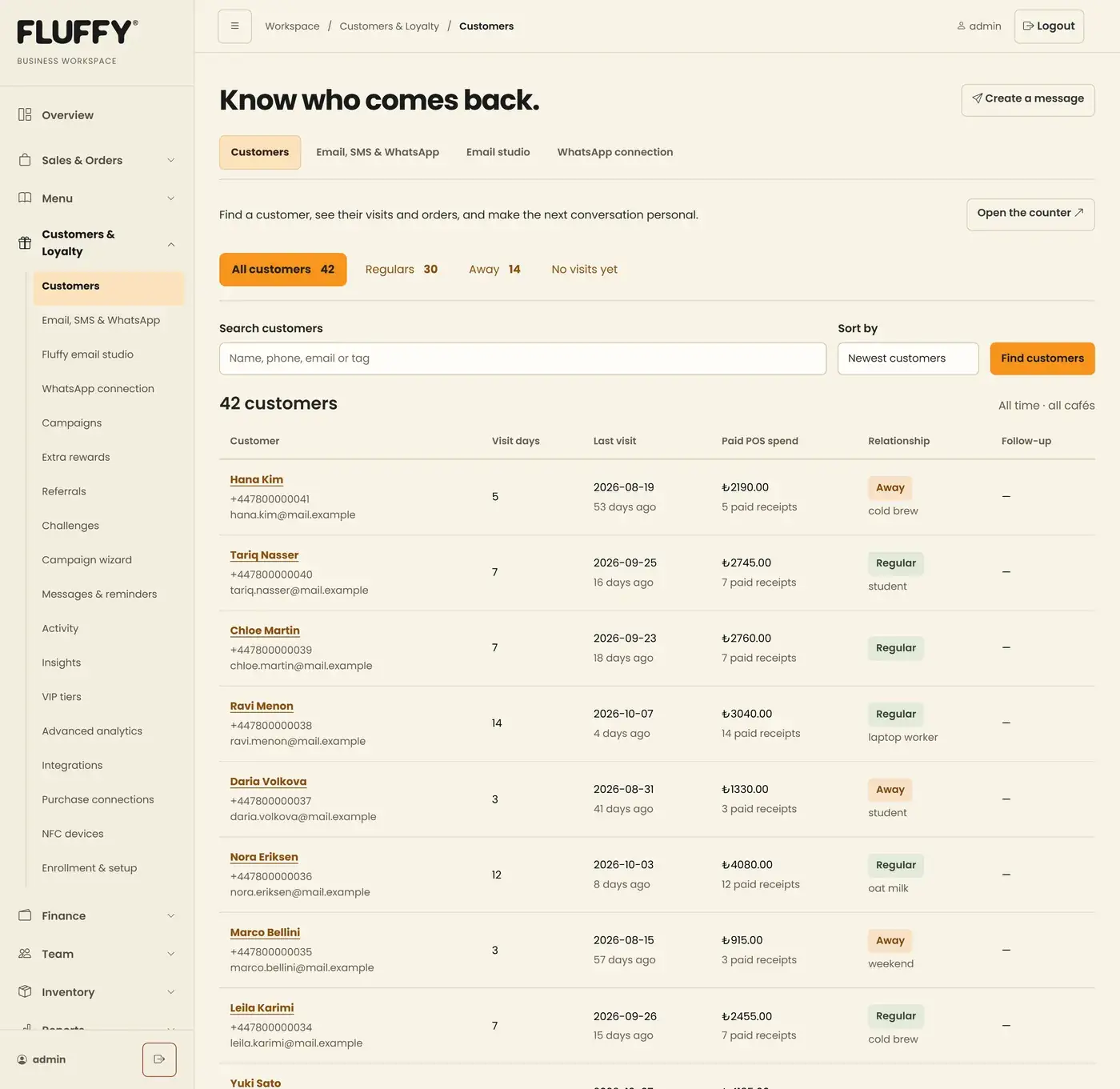
A WhatsApp-first CRM still starts with the customer record. The messages come second. In Fluffy’s case, every loyalty member appears in the directory automatically. A profile holds contact details, notes, follow-up dates, contact permissions, orders, visit patterns and message history.
Visits come from data the café already has: paid loyalty stamps, paid till receipts and menu orders linked to the customer. That gives useful groups without anyone tagging customers by hand. Regulars are people with five or more visit days. Away means they haven’t come in for longer than a threshold the owner sets. No visits yet speaks for itself.
Those groups are what make messaging worth doing. “We miss you” to people who are actually away is a reasonable message. The same text sent to everyone is spam.
Two ways to send on WhatsApp
There are two realistic routes for a small business, and the CRM supports both.
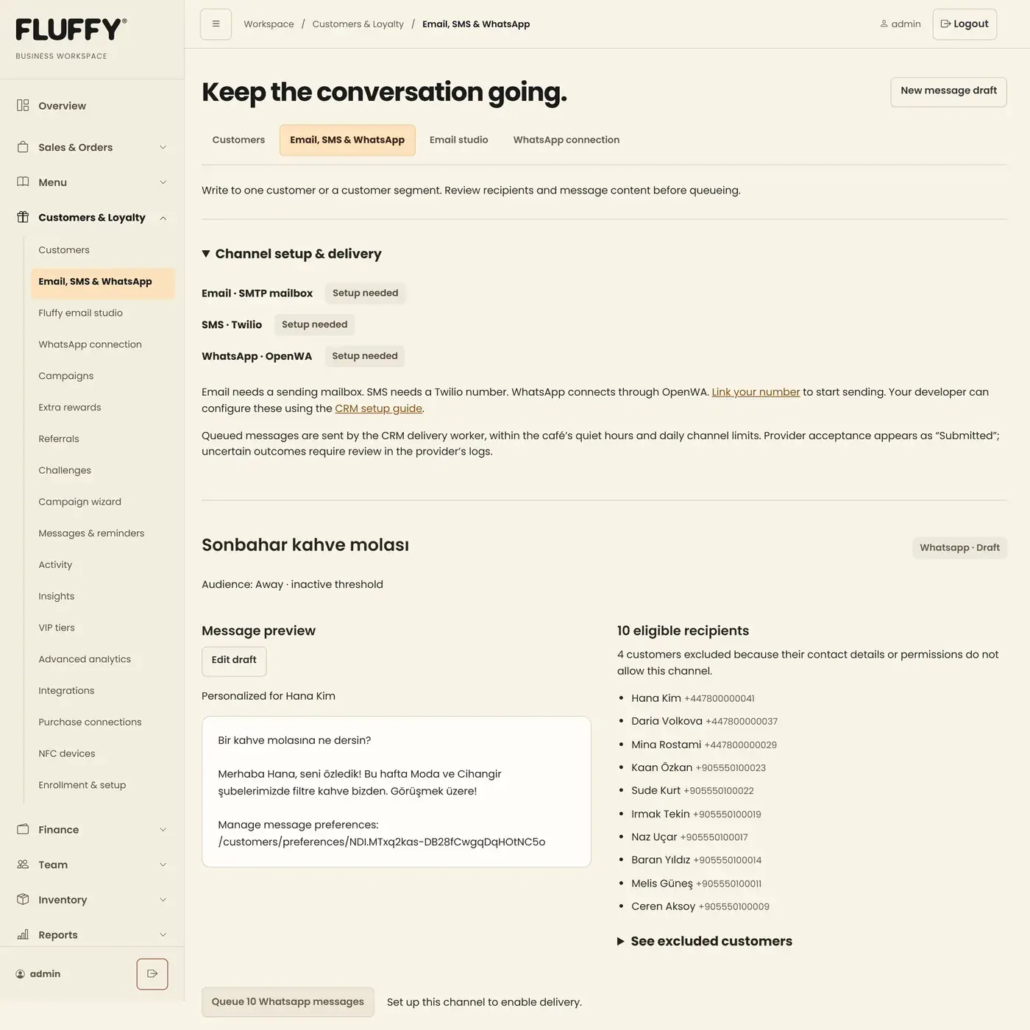
The official route, through Twilio. Messages use templates that WhatsApp has approved in advance. You configure the exact approved text, opt-out wording included, and the only variable is the customer’s name. It’s slower to set up and less flexible. It’s also the route least likely to cause trouble with WhatsApp.
A linked phone, through a private gateway. The CRM can also send through a small gateway (OpenWA) running on the café’s own server, paired with a phone using WhatsApp’s Linked devices feature. That allows ordinary text with the customer’s name filled in. The trade-off is real: it relies on unofficial clients, so I tell owners to use a dedicated number, never their personal one, and that no one can guarantee the number won’t be restricted.
Because of that risk, the gateway route is paced hard. Messages go out at least 60 seconds apart, and the gateway itself is capped at 20 messages a day and 5 to people who haven’t been contacted before. That’s slow on purpose.
Consent before anything else
This is the part I won’t compromise on.
Existing customers start with WhatsApp and email permission switched off. Staff can record that a customer agreed, but they have to confirm it, and the change is logged. Every message carries a signed link where the customer can change or withdraw permission. On the gateway route, a reply of STOP, UNSUBSCRIBE or İPTAL removes WhatsApp permission automatically, and that is logged too.
Sending respects quiet hours in Istanbul time and a daily cap per customer and per channel. Right before each message goes out, the system checks again: is permission still there, is the number unchanged, is the campaign still active? If any answer is no, that message is cancelled.
Review, then send
Messages never go out from the compose box. You write a draft, save it, and preview it next to the list of who will receive it and who is excluded and why. Only then do you queue it. A separate worker does the sending, a few messages per run.
The status words are honest. “Submitted” means the provider accepted the message, nothing more. If a send times out, the system marks it uncertain and does not retry it on its own, because a customer receiving the same promotion twice is worse than one message going missing.
When the gateway is connected, incoming replies show on the customer’s profile with the date and direction, and a reply link opens the composer with that customer selected. Only known customers are matched. Group chats are ignored, and photos or files appear as a label without being downloaded.
Where it stands today
The CRM, the consent rules and the review flow are built. The private gateway is deployed on the server. What hasn’t happened yet is the last step that belongs to the café: linking a dedicated phone. Until that’s done, no customer messages have been sent through it, so I can’t show you delivery numbers. I’d rather say that than imply otherwise.
The Arabic side
For Arabic-speaking businesses, language handling matters as much as the channel. On the help desk I built for Dr. Ehab Hamarneh’s coaching academy, customers write the same course name several ways, with different letter forms and with Arabic or Western digits. The system normalises those spellings before matching so tickets are tagged correctly. The chat widget answers in Arabic by default. Tickets that arrive on Friday, Saturday or a public holiday get an automatic reply saying when the team will be back.
In Türkiye the default is Turkish, with English and Arabic available. Fluffy’s loyalty pages work that way, and Arabic switches to right-to-left.
What this means for your business
If your customers already write to you on WhatsApp, the channel is settled. The decisions that matter are smaller and more specific. Which number will you use, and is it one you can afford to lose? Official templates or a linked phone? Who on your team can send, and to whom? What happens when a customer says stop?
Answer those first and the software is the easy part.
If you’re working through these questions for your own business, I’m happy to talk them over on WhatsApp.
Related work: Fluffy Operations workspace

